Expert Slide and Photo Scanning Since 2002
4000 ppi High Resolution Slide Scanning
Affordable Scanning
www.old-photo.com
www.old-photo.com
Alphabetize Programs In Start Menu Windows 7
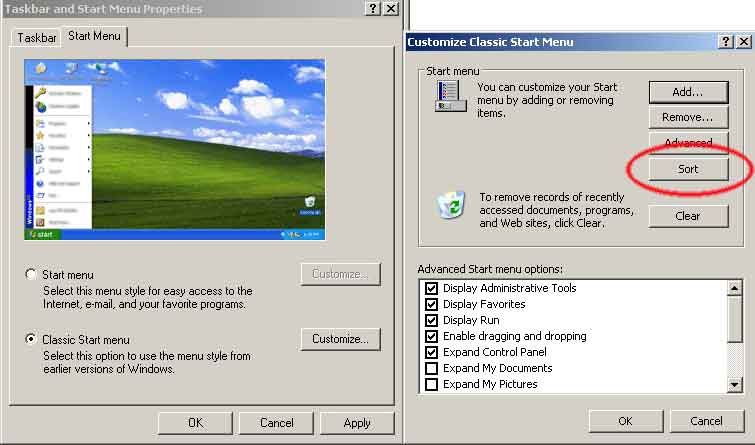
Windows XP adds new programs in the Start Menu to the end of the list. Over a period of time, you can easily end up with a lot of unsorted programs that are hard to find.
-
Right Click on your Start Button and choose: Properties
-
If you are using the Classic Menus, choose Customize.
-
Then click on Sort.
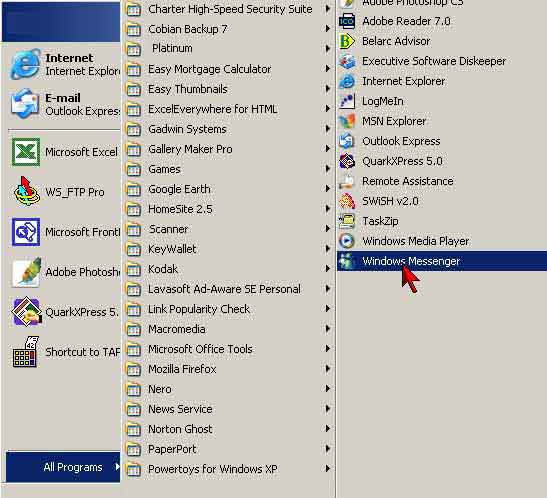 If you are using the Windows XP start menu view,
Click on the Start menu and the click on All Programs. Right click
on any of your programs and choose sort.
If you are using the Windows XP start menu view,
Click on the Start menu and the click on All Programs. Right click
on any of your programs and choose sort.
You can also sort your Favorites in Internet Explorer
First, open Internet Explorer. Click Favorites in the main menu that also includes File, Edit and View. Right-click any Favorite in the list and select "Sort by Name." Internet Explorer will alphabetize the Favorites, listing folders first.
Internet Explorer does not automatically sort Favorites inside folders so you will have to do this too. To alphabetize a list within a folder, first click Favorites from the main menu. Point to a folder until it shows its contents. Then right-click anything in the folder's list. Select "Sort by Name."
You will have to alphabetize the contents of each folder individually.
This method works only from Internet Explorer's main menu. The Favorites button, which shows your list in a sidebar, does not offer the "Sort by Name" option.
About Our Company
Affordable Scanning Services LLC
400 Bittersweet Lane
Waupun, WI 53963
Copyright 2023
Everyone needs to fill in and submit an order form online. This includes those who want to personally DROP OFF. There is a lot of information you need to read on the order form pages.
Please click here.
Get in Touch
After Hours, you will get a faster response by using Email. Please click the link above. We answer Email at all hours. Telephone messages are responded to during business hours.