Expert Slide and Photo Scanning Since 2002
4000 ppi High Resolution Slide Scanning
Affordable Scanning
www.old-photo.com
www.old-photo.com
Windows Folder Size In A File Explorer In Windows 10
What was M$ (Microsoft) thinking when they did not put an option into Windows Explorer that would allow you to see the size of your file folders? They still have not fixed this serious problem in Windows 7. They make it so your folders expand exponentially with files that you have no idea what they are and you can't even trace down which folders are causing the problems unless you right click on each of the stinking folders out of possibly hundreds and get information. Sheessshhhh........
For Windows XP there was a free utility called Folder Size by Brio. Folder Size for Windows added a new column to the Details view in Windows Explorer. The new column showed not only the size of files, but also the size of folders. It kept track of which folders you view, and scanned them in the background so you can see complete size of all files within the folder. It works with Windows 10.
We have found a pretty neat file explorer program that has some great features and it shows Folder Sizes.
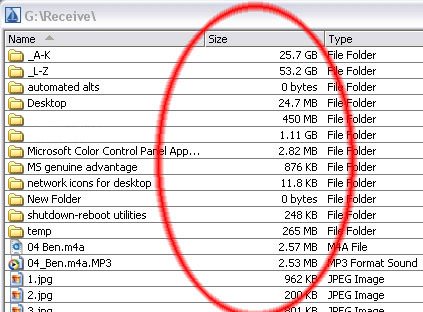
The program is called ExplorerXP. Yes it does work with Win10. It is freeware. You can't beat that price.
Download a copy at this website: www.explorerxp.com
Unlike the regular Windows Explorer, it displays the total size of each folder and allows you to browse multiple folders from a tabbed interface.
Look at these folder sizes showing up just as plain as you would like. Where the heck is M$'s head? Can't these people see this feature that has been needed from day one and has been conspicuously missing in action?
You can have lots of different explorer windows open at one time. Copy from one folder to the other easily. They can all be open at once or available from tabs at the top.
About Our Company
Affordable Scanning Services LLC
400 Bittersweet Lane
Waupun, WI 53963
Copyright 2023
Everyone needs to fill in and submit an order form online. This includes those who want to personally DROP OFF. There is a lot of information you need to read on the order form pages.
Please click here.
Get in Touch
After Hours, you will get a faster response by using Email. Please click the link above. We answer Email at all hours. Telephone messages are responded to during business hours.