Expert Slide and Photo Scanning Since 2002
4000 ppi High Resolution Slide Scanning
Affordable Scanning
www.old-photo.com
www.old-photo.com
Thumb Drive, Pen Drive, Safe Removal,
Corruption and Formatting
Safe Removal of Thumbdrives, Pendrives, etc...
If you remove thumbdrives, pendrives and other USB external devices without using the "Safely Remove Hardware" tool, you are in danger of corrupting your data and making your USB device virtually useless.
You need to tell Windows that you are going to remove a device so that Windows can finish whatever it needs to do with it. In the case of disks Windows flushes all disk buffers which will avoid potential corruption.
 Look for the Safely Remove Hardware Icon in your system tray.
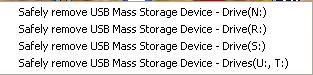
Click on the icon and choose your drive to remove. If the icon is not in your system tray, see below.
Safe Removal Hardware Icon Missing Form System Tray
If your Safely Remove Hardware icon is not in your system tray, you can get it back by clicking on Start, Run and type in:
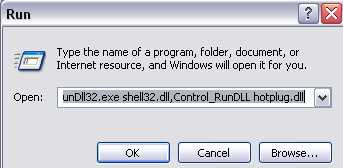
RunDll32.exe shell32.dll,Control_RunDLL hotplug.dll
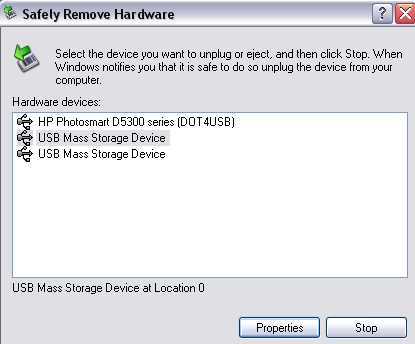
This will bring up the "Safely Remove Hardware" dialog box.
You can select the device that you want to remove.
If you have multiple devices, you might want to expand the information by selecting the Display Device Components box..
When you use this function, it will restore the "Safely Remove Hardware" icon to your system tray when you have a removable device attached.
Formatting Corrupt Thumbdrives, Pendrives
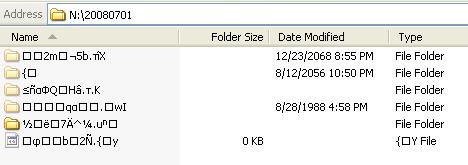 If you are learning your lesson of how to remove your USB hardware the hard way, you probably are going to have some corrupted files and folders on your thumbdrives or pendrives.
If you are learning your lesson of how to remove your USB hardware the hard way, you probably are going to have some corrupted files and folders on your thumbdrives or pendrives.
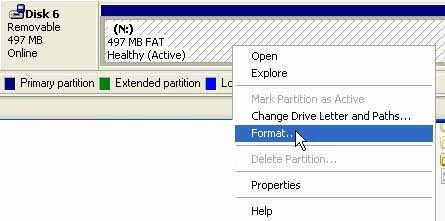
If you try to format the thumbdrive using your Windows Explorer, you are probably going to end up with not being able to do the formatting and restoring your drive back to use. Even booting into Safe Mode may not allow this to be accomplished.

In order to format the thumbdrive go to the Start Button and click on it. Click on RUN. Type in diskmgmt.msc This will bring up your disk management dialog tool.
About Our Company
Affordable Scanning Services LLC
400 Bittersweet Lane
Waupun, WI 53963
Copyright 2023
Everyone needs to fill in and submit an order form online. This includes those who want to personally DROP OFF. There is a lot of information you need to read on the order form pages.
Please click here.
Get in Touch
After Hours, you will get a faster response by using Email. Please click the link above. We answer Email at all hours. Telephone messages are responded to during business hours.