Expert Slide and Photo Scanning Since 2002
4000 ppi High Resolution Slide Scanning
Affordable Scanning
www.old-photo.com
www.old-photo.com
USB Device Safe Removal
You cannot just pull the USB plug out of the computer and not
possibly cause a problem.
You have to do an orderly dismount of the USB drive.
 Look
for the “Safely Remove Hardware” icon in the system tray.
Look
for the “Safely Remove Hardware” icon in the system tray.
Left Click on it.
Left Click on it.
 Then click on the window.
If there is no program accessing the drive, then the drive will
be removed from the system and you can remove the USB cable and the
drive.
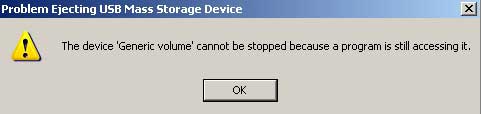
If you get a message that the device cannot be stopped, ("generic volume cannot be stopped because a program is still accessing it") then you either have to wait an undetermined amount of time, or you just shut down the computer and disconnect the drive and reboot.
If you double click on the icon in the system tray, this is the
window that you will get.
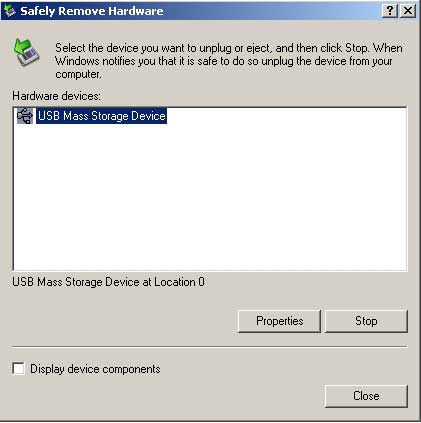
You can try stopping the service here too but it won’t make any
difference if it won’t stop by simply clicking on the icon.
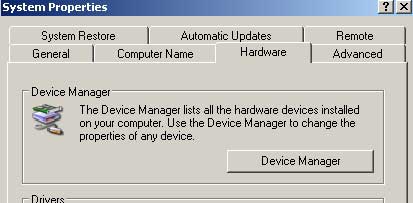
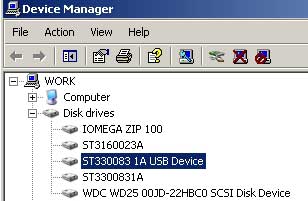
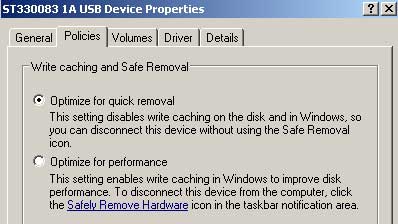
One thing you can check is if your drive is optimized for Quick
removal. Go to System Properties, Device Manager, Disk Drives,
Double click on your drive and then on the Policies Tab, Optimize
for Quick Removal.
About Our Company
Affordable Scanning Services LLC
400 Bittersweet Lane
Waupun, WI 53963
Copyright 2023
Everyone needs to fill in and submit an order form online. This includes those who want to personally DROP OFF. There is a lot of information you need to read on the order form pages.
Please click here.
Get in Touch
After Hours, you will get a faster response by using Email. Please click the link above. We answer Email at all hours. Telephone messages are responded to during business hours.