Expert Slide and Photo Scanning Since 2002
4000 ppi High Resolution Slide Scanning
Affordable Scanning
www.old-photo.com
www.old-photo.com
Packaging Your 35mm Slides
It is very important that you read these 3 pages from beginning to end. Please Note: If you do not want to go to the trouble of doing this Slide Prep yourself, we can do it for you for a small fee per slide.
Slide
Prep, Page #1 Storage
Containers
Slide
Prep, Page #2 Organization and Orientation
Slide
Prep, Page #3 Packaging Slides for Shipment
Slide
Prep, Page #4 We can do your slide orientation and stacking for you.
We can do your slide orientation and stacking for you.
- >
It is up to you how you ship the stacks of slides but, if you use rubber bands, we would suggest using two rubber bands per stack since many time slides arrive with broken rubber bands. If the slides are not numbered, we have no way to know what order they should be in.
Number the piles of slides so that we know the position in the show. When you put your identifying number on the slide stack we are going to assume that is the start of that stack. If you put the number on the bottom of the stack instead of the top of the stack, your slides will be scanned in the opposite direction than you intended. Be careful that you do your preparation carefully.
 We
would suggest putting a piece of 2"x2" blank
cardboard on the top and the bottom of the piles
so as to protect the slide emulsion. Also, label
the pile as to the order in the slide show and
identify the "start" and "end" of the pile, just
to remove any possible confusion.
We
would suggest putting a piece of 2"x2" blank
cardboard on the top and the bottom of the piles
so as to protect the slide emulsion. Also, label
the pile as to the order in the slide show and
identify the "start" and "end" of the pile, just
to remove any possible confusion.
You also do not want the piles too high, otherwise when the rubber bands are removed, the whole pile may be hard to control. Be careful not to get fingerprints on the slides. (Remember that we do NOT do slide cleaning.)
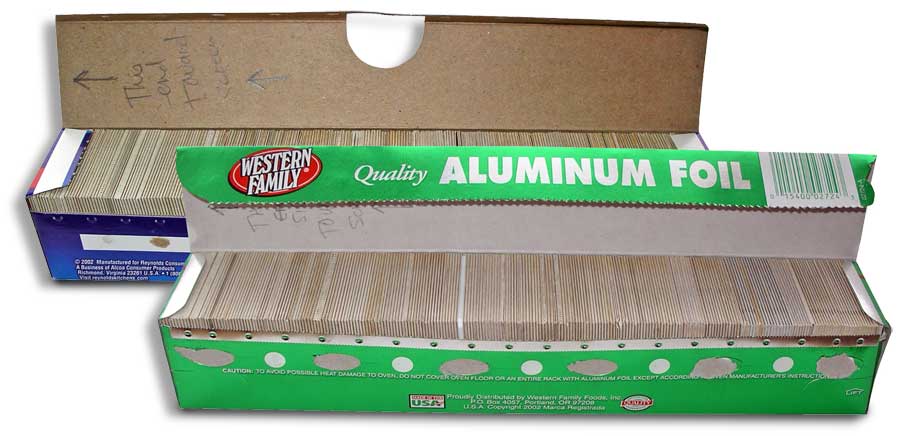 Here
is one way a customer recently shipped his collection of slides. He
used some empty boxes that aluminum foil had come in. We think this
is a great idea and, if you want to copy this method, we are
perfectly fine with it. They are just the correct size for the 2" x
"slides.
Here
is one way a customer recently shipped his collection of slides. He
used some empty boxes that aluminum foil had come in. We think this
is a great idea and, if you want to copy this method, we are
perfectly fine with it. They are just the correct size for the 2" x
"slides.
If you use this method, please put a piece of tape over the metal cutting edge before you start putting the slides in the box or you may cut yourself. This will also protect our workers when they have to take the slides out and put back in again.
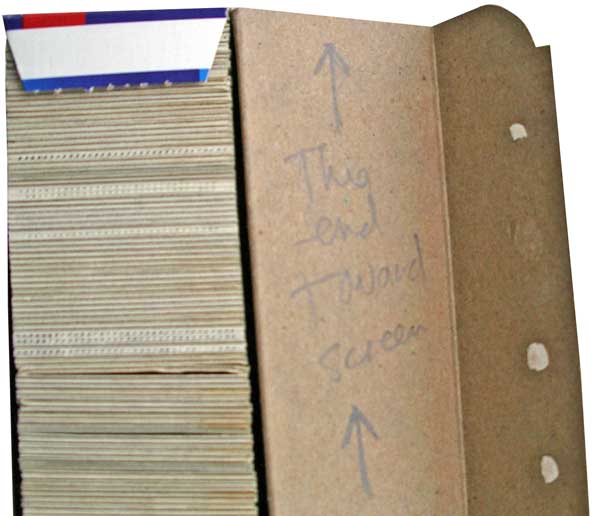 Make
sure you get your slides all facing the correct way and the #1 slide
should be the one that is on the end that is closest to the
"screen."
Make
sure you get your slides all facing the correct way and the #1 slide
should be the one that is on the end that is closest to the
"screen."
Be sure to mark on the box which side of your stack of slides faces towards the screen. Click to see our Slide Orientation Movie
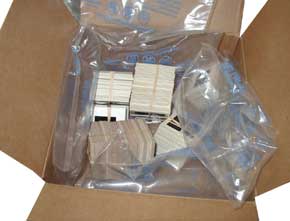 When
packing for shipping, if you have the air bag
packing, it seems to work really well. You might
also want to put the 35mm slides into plastic bags.
When
packing for shipping, if you have the air bag
packing, it seems to work really well. You might
also want to put the 35mm slides into plastic bags.
 If
you are going to pack your shipping container
with foam "peanuts" or some other type of
packing material that might rub off onto the
slides, put the slide bunches in a plastic bag
to protect them.
If
you are going to pack your shipping container
with foam "peanuts" or some other type of
packing material that might rub off onto the
slides, put the slide bunches in a plastic bag
to protect them.
If you would like to ship via Priority Mail and use the U.S. Postal Service's FREE Priority Mail boxes, please click on this link for more information.
Slide
Prep, Page #1 Storage
Containers
Slide
Prep, Page #2 Organization and Orientation
Slide
Prep, Page #3 Packaging Slides for Shipment
Slide
Prep, Page#4 We can do your slide orientation and stacking for you.
Click to see our Slide Orientation Movie
About Our Company
Affordable Scanning Services LLC
400 Bittersweet Lane
Waupun, WI 53963
Copyright 2023
Everyone needs to fill in and submit an order form online. This includes those who want to personally DROP OFF. There is a lot of information you need to read on the order form pages.
Please click here.
Get in Touch
After Hours, you will get a faster response by using Email. Please click the link above. We answer Email at all hours. Telephone messages are responded to during business hours.