Bell & Howell 35mm Slide Cube Projector

Bell & Howell’s cube system could store hundreds of slides in a compact space—but it was prone to jams. If your slides are in cubes, we can scan them—just follow the orientation steps below.

The concept was sold through the 1980s. Slides were stacked loose inside clear plastic cubes (up to ~44 slides per cube). Storage boxes held sixteen cubes—the same footprint as a Kodak 140 Carousel—so you could store roughly 640 slides in the space that held 140 Carousel slides.
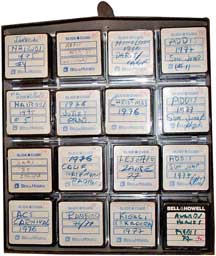
Bell & Howell slide cube storage box
Slide cube storage box (holds 16 cubes)

How the projector advanced slides

Open the cube’s sliding door and seat the cube on the projector. Each advance dropped a single slide onto a circular rotating plate with a slide-sized recess. After projection, slides fell into the collection chamber below. When a cube was empty, a lever lifted slides back into the cube for removal and the next cube could be loaded.

Why the system had issues

  • Jams at the rotating plate: warped or damaged mounts could catch.
  • Limited reverse: you couldn’t go back more than one slide—others had already dropped.
  • Fragile hardware: cube doors/covers were easy to break.

How to prep cube-stored slides for scanning

  1. Landscape orientation: Place all slides so the long edge is horizontal. We’ll rotate images in Photoshop as needed.
  2. First slide on top: When you open the cube door, the top slide should be the first slide to scan. Keep the rest oriented the same way.
  3. “This side toward screen” faces up: Typically the logo/text side faces the screen; we’ll assume that for scanning unless you tell us otherwise.
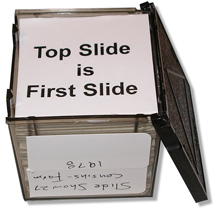
Top slide in cube is the first to scan
Top slide = first slide to scan

Open the cube door; the top slide should be first. Keep all slides oriented identically.
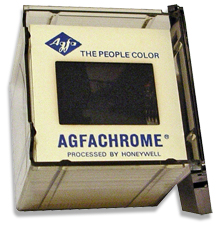
Correct side toward screen and toward top of cube
Correct “toward screen” side up

The “this side toward screen” (often the logo side) should face the screen and be toward the top of the cube.
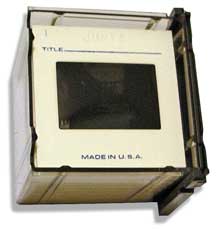
Incorrect orientation example—flip these over
Wrong way—flip these

If the slide faces are inverted vs. the screen/top, flip them so everything is consistent.

Note: We do not sell parts for Bell & Howell cube projectors. If you use our slide scanning service, you won’t need to repair a projector or replace bulbs again—your images will be preserved as digital files.


Start Your Order

You Don’t Always Get What You Think You Are Paying For

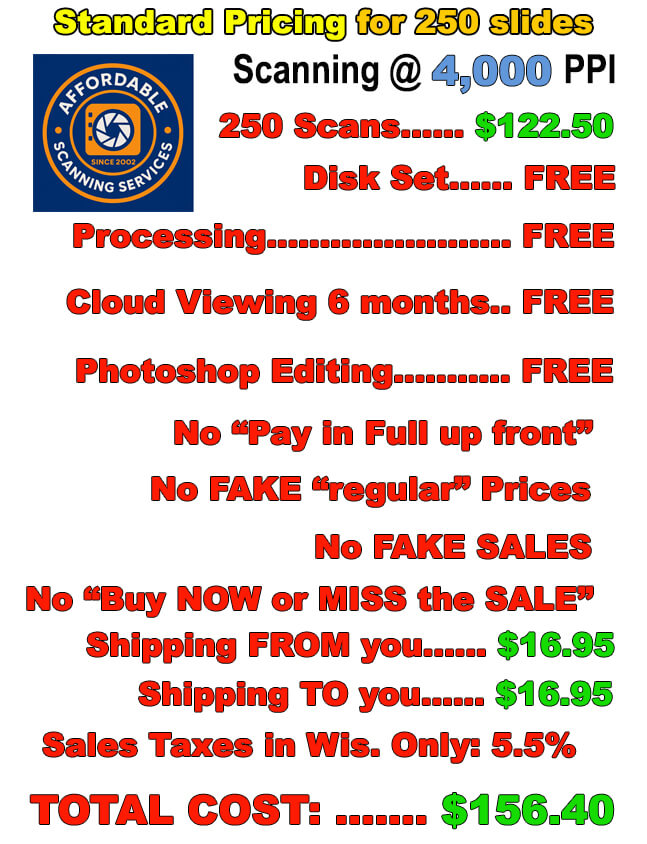
250 Slides Scanned to Images

Price Comparison — May 1st 2026
Item
Legacy Box
10 items = 250 slides
⚠ “Sale” every single day of the year
Affordable Scanning
250 slides, flat rate
✓ One real price. No games.
Digitizing Kit
250 slides (10 items)
$319.98 regular
$112.00 “Mothersday”
These “sales” have been running every day for years. The “regular” price is fake.
$122.50
250 slides @ 49¢ each
Disc Set
Physical media with your images
$19.99
Add-on cost
FREE
DVD data disc included with every order
Cloud / Online Viewing
FREE* for 30 days
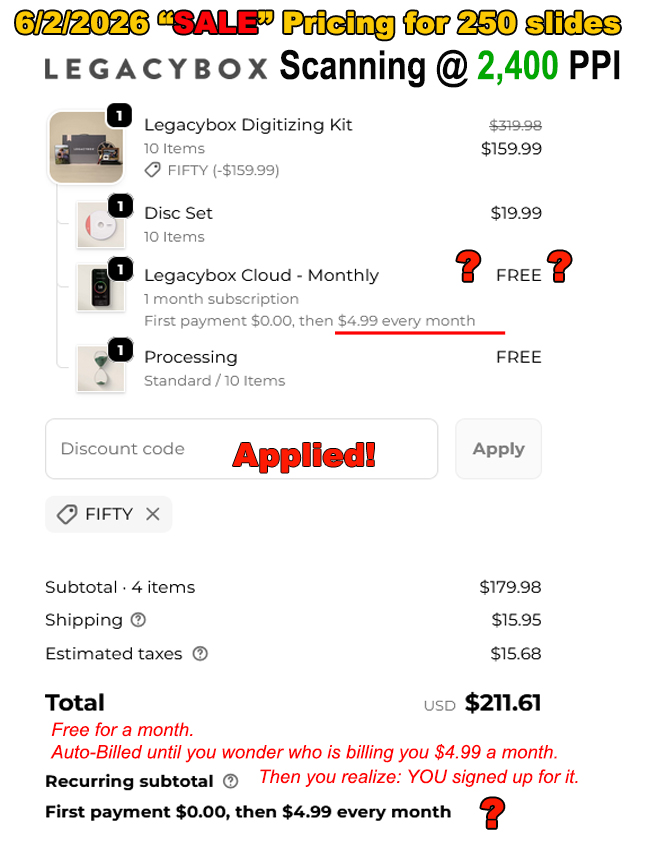
*Then $4.99 every month — AUTO-BILLED. You signed up for this whether you realized it or not.
FREE — 6 months
No subscription. No auto-billing. Ever.
Processing / Editing
What happens to your images?
FREE
Automated batch scanning @ 2,400 PPI. No individual editing. No color correction. No Photoshop. What you get is what the machine produces.
FREE — Expert Photoshop
Every 4,000 PPI scan individually color-corrected, exposure-adjusted, and cropped by a real person.
Scanning Resolution
Higher = more detail
2,400 ppi
Who scans at this low of a resolution these days?.
4,000 ppi
Our resolution is at almost twice as many pixels.
Shipping
Round trip
$15.95
One-way (their prepaid label — they are the shipper, not you)
$33.90
$16.95 to us + $16.95 back to you. USPS Priority Mail with tracking.
Estimated Taxes
$11.84
Wisconsin residents ONLY. (5.5%)
Discount Code
MOTHERSDAY
This code — or one just like it — is always available. The “regular” price without it is simply a made-up number.
No code needed.
Our current price is always our real price.
TOTAL
Legacy Box "regular price"
$367.76
($319.98 kit + $19.99 disc + $15.95 ship + $11.84 tax)
Nobody actually pays this — it exists only to make the “sale” look impressive.
$156.40
Always. No games.
TOTAL
Legacy Box “sale” price
$159.78
This is actually not a bad price if you can live with low resolution scanning and NO PHOTOSHOP editing. But, why would you?
Plus $4.99/month cloud subscription — auto-billed until you cancel.
That is $59.88 more per year if you forget to cancel.
Total: $156.40
You get scanning at 4,000 PPI PLUS FREE Photoshop editing of every scan and we are still $3.30 less expensive than their biggest sale of the year.
You save $211.36 vs their “regular price which they never charge.”

Legacy Box Checkout Screenshot — Updated Periodically

This is what their checkout actually looks like. Notice the auto-billing subscription buried in the fine print.

⚠ Legacy Box Actual Checkout — 250 Slides — Updated Periodically
Legacy Box pricing comparison showing hidden fees and auto-billing subscription