Organizing Metal or Plastic 35mm Slide Cases
Use these quick orientation tips to load 35mm slides into metal or plastic cases the same way we’ll scan them—so images read correctly and your chapters stay in order.
General Guidelines
- Keep all slides in Column #1 facing the same direction as the case side you reference (Lock or Hinge).
- When you hold the first slide up to the light, text on signs will appear reversed (“WRONG”) when oriented correctly for scanning.
- Divide chapters by inserting a thin card between slide groups—easy to spot and keeps sets intact.
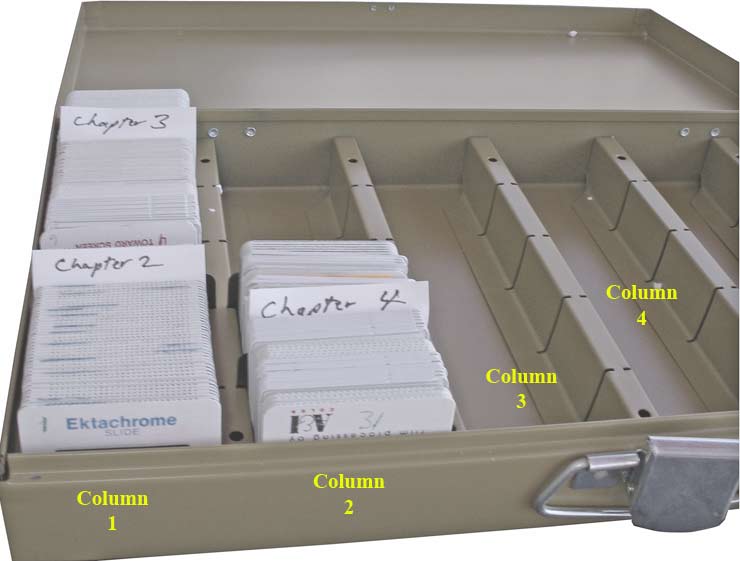
Place the first slide in Column #1 facing the lock; the emulsion should face the lock as well. If you hold that slide to the light, any sign in the image would read WRONG (mirror).
Use a small card between topics to mark chapters.
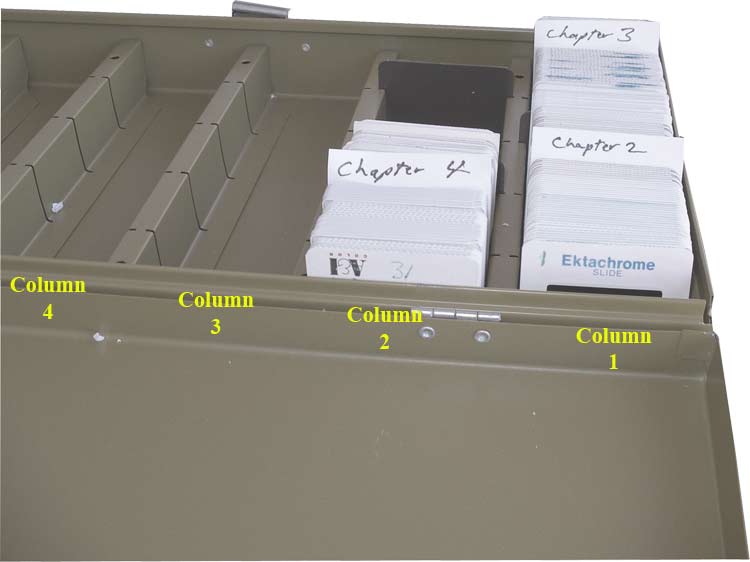
Place the first slide in Column #1 facing the hinge; the emulsion should face the hinge as well. Held to the light, text in the image would also read WRONG.
Again, separate chapters by inserting a card between groups of slides.
Ready to digitize your slides?