Expert Slide and Photo Scanning Since 2002
4000 ppi High Resolution Slide Scanning
Affordable Scanning
www.old-photo.com
www.old-photo.com
Terms & Conditions
#1 Order Forms
You must fill out our online order form with your order. If you do not, it will be assumed that you have read all our directions and terms and conditions and agree to them. If you do not send an order form, it makes processing your order much harder for us and you will not have an estimate of what your return shipping will be.
#2 Please Clean Your Slides
We advise everyone to go over their slides with a very soft cloth before sending to us. The slides are hit with a small puff of air before scanning but that does not remove anything other than loose material. For the most part, the slides are somewhat greasy, for lack of a better term, and the dirt or dust is going to stick there until you remove it with a soft cloth. We advise you do the cleaning before we scan them.
The same is true for View-Master Reels. Because these get magnified even more that regular slides, dust is going to show up even more if you do not clean them, both sides.
#3 Please Clean Your Paper Photos
We have very clean conditions. We want to give you the very best scans that we can. Some would think that it isn't necessary to clean paper photos, but it is. Any dust or lint or whatever might get on your scan is going to be coming from what you send us. We wipe down our scanning glass periodically but a few scans might get through with some kind of unwanted material scanned into your image. If it is there, you sent it to us. At our low pricing, we just can't go back through possibly thousands of photos and find a particular photo and rescan it because you had something stuck to your photo that transferred to our scanner. We don't charge enough to do that.
#4 Unedited Scans
We do not send out unedited scans under any circumstances. Original scans are all deleted after the job is sent out. The job is considered complete and there is no need to take up storage space with original scans. All scans are worked by our Photoshop experts and nothing leaves our offices in a "raw" condition. No exceptions. None. Don't ask. We get your slide scans to look the best we can, and that is what we send you.
#5 Artists, Professional Photographers, Hyper-critical people
Those people that will be hyper-critical, such as artists or professional photographers, should realize that you are not going to be getting a $30 drum scan for our minimal 39 cent pricing. Because of the very nature of this work of scanning possibly thousands of slides, there are no do-overs at this low rate. Do not send any more slides for processing than you are prepared to pay the full cost for our work. Take advantage of our free sample scans or just send a small order to start with so you can see the quality of our work. We take pride in our work and think we give great value at a minimal cost. Try the free sample scans and you will see.
If, after scanning, you want us to go back and pull slides and compare them to images, there will be a per hour charge of $30 or whatever our current rate for editing images is. This is very time and labor intensive and it is not included in our low pricing.
#6 Counting your slides
If you are dealing with more than 50 slides, it might prove difficult to get an accurate count of your slides. It takes us extra time to do a refund if you under count. It would be better for you to just do a rough count and only pay the DEPOSIT amount on the order form. We will bill you for the balance.
If you would like any OVER PAYMENT to be counted as a "tip", then please write a note on your copy of the order form that you send to us.
#7 Thicker Than Normal Slides
Pricing is for scanning 35mm or other slides in normal thickness, which would be defined as equal to or less than the thickness of a Quarter Coin, 2"x2" cardboard or plastic mounts. (See instructions for 110, 127 size slides.) (Yes, we do scan your glass mounted slides or the special 3D viewer slides or extra thick mounts but they cost extra. Look for that option on the order form. Call if you need help.)
#8
#9 Mac Computers
Regarding Mac computers: We have never, since 2002, had anyone say that their Mac could not, at least, read our disks so that they can pull the images off. As with PCs, computer operator knowledge is important.
#10 Organization And Orientation
1. 99.9% of the time, the side of the slide that has the "Logo" on it will be the FRONT of the slide. When projected, the light goes through the "Back" of the slide and out the "Front" and onto the screen. Some slides even say "This Side Faces Screen" or similar. This is the "Front". When you put the slide in a projector, it faces the Front of the projector.
2. When you number your slides ALL NUMBERING goes on the FRONTS. The Logo side. Never on the backs.
3. ROTATE THE SLIDES SO THE FILMS ALL ARE ORIENTED THE SAME: All Rectangle slides oriented the SAME. Do not worry about what is in the picture. Grandma is in a Portrait picture with the rectangle rotated "up"? Don't do it. Do you want a head "cut off" in scanning because the slide was rotated OUT of our scanning "frame" which is a "RECTANGLE" in a horizontal orientation? Please just do it according to our simple instructions. We will fix the orientation when we Photoshop each scan. Grandma is going to look just fine.
4. When you make your stacks, the TOP slide, which will have the LOGO on it, will be scanned FIRST, it is #1 and will be the #1 image in your folder, and the Bottom slide will be LAST. All Stacks having the slide FRONTS facing UP in the stack.
#11 Organization And Orientation
35mm slides or Photos should be organized into the order you want them to show. Please check our movie instructions for directions on how to stack your slides properly for scanning.
1. 99.9% of the time, the side of the slide that has the "Logo" on it will be the FRONT of the slide. When projected, the light goes through the "Back" of the slide and out the "Front" and onto the screen. Some slides even say "This Side Faces Screen" or similar. This is the "Front". When you put the slide in a projector, it faces the Front of the projector.
2. When you number your slides ALL NUMBERING goes on the FRONTS. The Logo side. Never on the backs.
3. ROTATE THE SLIDES SO THE FILMS ALL ARE ORIENTED THE SAME: All Rectangle slides oriented the SAME. Do not worry about what is in the picture. Grandma is in a Portrait picture with the rectangle rotated "up"? Don't do it. Do you want a head "cut off" in scanning because the slide was rotated OUT of our scanning "frame" which is a "RECTANGLE" in a horizontal orientation? Please just do it according to our simple instructions. We will fix the orientation when we Photoshop each scan. Grandma is going to look just fine.
4. When you make your stacks, the TOP slide, which will have the LOGO on it, will be scanned FIRST, it is #1 and will be the #1 image in your folder, and the Bottom slide will be LAST. All Stacks having the slide FRONTS facing UP in the stack.
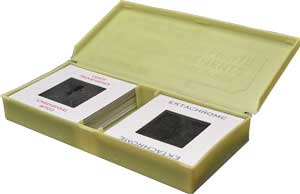
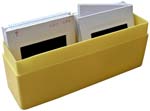
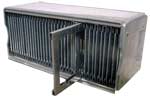
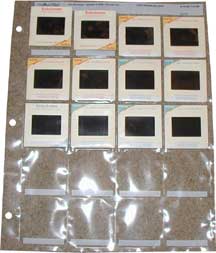
#12 Storage Containers That Incur "Slide Prep" Charges:
These types of containers make it hard for us to be able to maximize our efforts and be able to keep our prices low. These containers result in our having to take extra time to do the scanning because we can't just grab a handful of slides and scan them. We are sorry but somebody has to take the time to stack and orient the slides so we can scan them expeditiously. |
|
 |
 |
 |
 |
 |
|
If you send your slides to us in these types of containers, or similar, we have to charge you our "slide prep" fee, as above. See our order form for our minimal fee for slide prep. |
|
#13 Slide Condition & Final Images
Please note that we will take whatever steps we deem necessary to do what we think will make your images look as good as possible, given the circumstances. This may include changing a grossly colored image from a slide that had dyes faded away, to black and white or to sepia tone at our discretion. Because, during the scanning process, shadows or dark areas tend to fill in, we also have our Photoshop experts open these shadows up again so more details can be seen. Sometimes contrast and depth of color has to be sacrificed in the process. It is a balancing act to try to get the transfer from one medium to another as good as possible. Please know that we work your images just as though they were our own. All image editing will be at the sole discretion of our Photoshop editors, with no do-overs whatsoever. Realize that you are paying a very minimal price and getting a lot for it. Do not expect drum scanning, at $30+ per slide, which might not even include color matching, for our minimal fee. All color moves are overall and some individual areas of the image might be sacrificed for the good of the whole image. Sunrise and sunset photos, any slides with natural reddish colors are particularly difficult because dye fading on the slide makes it hard to know just what the original looked like. We do not even look at the slide when we do color editing because we are simply editing for "pleasing color" and that is entirely up to the individual Photoshop editor at that time and might even include changing a discolored image to black and white. We do the best we can. We do not guaranty that you are going to be completely happy because you may expect more from your slides than they can deliver. We guaranty that we are going to do the best we can given the amount of time we have to do the work. You can get a good idea of the quality of our work by sending in ten of your slides, good and bad and letting us do a free sample scan for you.
Monitor and TV screens will have different adjustments and an image displayed on 100 different displays may look different on each on. This is the nature of the LCD screen. (From Consumer Reports: "Flat-panel displays deliver a very clear image but have some quirks. Their range of color is a bit narrower than a CRT's and you have to view the screen straight on to get optimal image quality. On most models, the picture can lose contrast as you move off-center, and fine lines might appear grainy.")
Every monitor or TV is going to show color differently. Walk into any Best Buy or other store with multiple monitors showing the same channel and you will see multiple different colored screens. Our monitors are calibrated for precision color and your TV or monitor is not. We cannot adjust our work so it will look the way you want it to look on your monitor or TV. Plus, you have to realize that probably 75% of the slides that we work on are faded or discolored in some way. We do the best we can. If you have any doubts about our process, please send us ten of your slides so that we can do a free sample scan of your slides. Send good ones and bad ones so you can get a feel for our technical expertise. Those people that will be hyper-critical, such as artists or professional photographers, should realize that you are not going to be getting a $30 drum scan for our minimal prices. Because of the very nature of this work of scanning possibly thousands of slides, there are no do-overs at this low rate. Do not send any more slides for processing than you are prepared to pay the full cost for our work. Take advantage of our free sample scans or just send a small order to start with so you can see the quality of our work. Many of your slides will have dirt or fingerprints on them. We do not do slide cleaning. In most cases, the use of a very soft cotton cloth to clean dirt off the slides will greatly improve your final scanning results. Do this before you send them to us. Because of the possibility of damaging slides, we do not clean your slides for you. At our low prices, we cannot be responsible for any dirt on your slides. Slide film that is not perfectly flat may result in part of the scan being out of focus. We see a lot of warped films because the heat from projectors damages the films if they have spent a lot of time in front of the hot projector lamp. We do the best we can with these slides but we can't "un-warp" your slide films. The damage is permanent. Please also check our page regarding "my slides look good but my scans are out of focus."
#14 View-Master Reels
View-Master Reels sometimes become warped and dried out. We have to flatten them to get them ready for scanning. Because of age, the glue holding the films in the reels might come loose and maybe the films will come out of the reel. We do not put them back into the reels. If they come out, they all go into an envelope for return after scanning. Because these get magnified even more that regular slides, dust is going to show up even more if you do not clean them, both sides.
#15 Disc Camera Negative Reels
Realize that Disc Camera Negatives are notoriously blurry. We do what we can with them. The charges are so hight because we had to set up a special scanner station for scanning them. We can't lose money on our scanning. If the price is too high for you, we understand.
#16 VHS Tapes, VHS-C Tapes, Video8 Tapes, MiniDV Tapes, other tapes:
We no longer scan tapes or movies
#17 Order Changes: Do Not Assume Anything
Once we receive your order, if you change any part of your order, you must document that change specifically and in an email or snail mail and do it before we create disks. Example: If you change from one type of disk format to another format and decide you want or don't want music on your disk, you must specifically state this desire, otherwise no music is usually our default setting. Please do not assume anything. We have a lot of options on our order form for a reason. If you want to make a change, read the order form to understand what your options are and then specifically ask for the options you want. If you have a question, please ask. If you want a change before disks are created, we will be glad to help you. We want you to get what you want. Please confirm any changes discussed on the phone in an email or snail mail.
#18 Return Shipping and Final Payment: Yes, we will return everything to you.
We will return everything that you send to us and we only charge you what it costs us to do it. It is difficult to know, ahead of time, what shipping charges will be because we don't know what kind of containers you will be using. It is a matter of weight. Once we receive your final payment, we ship everything.
#19 We Try to Keep Backups of All Scanning Projects
We have kept backup copies of all image scans since 2002. They are on backup hard drives. If you run into a problem with your disks or images, in the future, we very likely will be able to restore your images for you. There is a charge for restoration. We urge everyone to make their own backup copies and keep those copies somewhere other than your home.
About Our Company
Affordable Scanning Services LLC
400 Bittersweet Lane
Waupun, WI 53963
Copyright 2023
Everyone needs to fill in and submit an order form online. This includes those who want to personally DROP OFF. There is a lot of information you need to read on the order form pages.
Please click here.
Get in Touch
After Hours, you will get a faster response by using Email. Please click the link above. We answer Email at all hours. Telephone messages are responded to during business hours.